AI Integrations & Agents
AI integrations that survive contact with production
Document processing, support agents, and LLM features wired into the systems you already run — with evaluation, cost controls, and a fallback when the model is wrong.
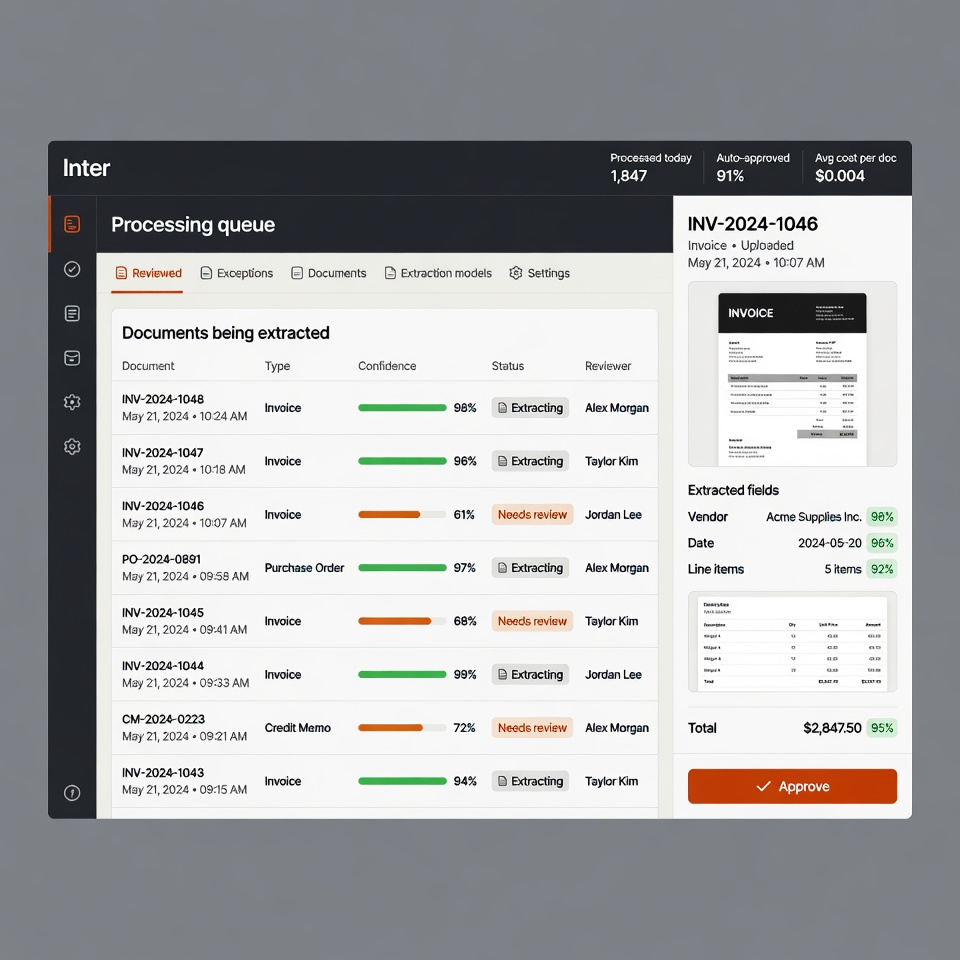
The demo works. The production system is a different problem.
Getting an impressive AI demo takes an afternoon. Getting something that holds up against real inputs, at a cost you can predict, with a sensible answer for the cases where the model is confidently wrong, is the actual engineering — and it is where most AI projects quietly stall.
Three things break AI features in production. The first is cost: token spend scales with usage in a way that is easy to miss until the invoice arrives, particularly when a naive implementation sends far more context than it needs on every call. The second is reliability: models produce plausible wrong answers, and a system with no evaluation harness has no way to detect quality degrading after a prompt change or a model update. The third is integration: an AI feature that cannot read your actual data is a toy, and connecting it to real systems is normal software engineering work that the AI framing tends to obscure.
The useful question is rarely "where can we add AI". It is "which specific task is expensive, high-volume, and tolerant of a human check". Document extraction, first-pass support triage, and summarising long records all fit that shape. Anything where a wrong answer is expensive and unreviewable generally does not.
Treating an AI feature as a normal software project — with a data model, error handling, monitoring, and a rollback path — is most of what separates the ones that ship from the ones that stay in pilot.
How an engagement runs
-
Pick a task worth automating
Discovery starts by finding the specific high-volume, error-tolerant task where automation pays for itself — not by looking for somewhere to put AI.
-
Build the evaluation set first
A set of real inputs with known-correct outputs, before any prompt work. Without it there is no way to tell whether a change made things better or worse.
-
Wire it to real data
The integration work — reading from your actual systems, handling their formats and failure modes — is ordinary engineering and usually the bulk of the build.
-
Cost and rate controls
Token budgets, caching, and model selection per task, so spend is predictable rather than discovered at the end of the month.
-
Human in the loop where it matters
A review path for low-confidence outputs, and monitoring that surfaces quality drift after a model or prompt change.
Proof
Contract review: two to three hours down to fifteen minutes
A commercial masonry contractor was losing two to three hours per contract getting a 300-page subcontract ready for their attorney — reading it through, marking what mattered, and assembling questions. That prep time carried real attorney fees on top, and the back-and-forth that followed cost them bid deadlines more than once. We built a review tool that ingests the contract and produces the structured pre-review: the clauses that actually decide risk — indemnification, payment terms, scope creep, termination — pulled out with the relevant language attached and flagged for a human to confirm. The attorney still does the legal work. They just start from a package instead of a PDF. Same prep, fifteen minutes.
2–3 hours → 15 minutes per contract · 300-page subcontracts · attorney reviews a package, not a PDF
What an AI integration costs
AI work is priced the same way as any other build, with one addition: ongoing model cost is estimated during discovery and designed for explicitly, rather than left to be discovered on the first full invoice. Small, well-scoped automations of a single task sit at the lower end. Anything requiring retrieval over a large document corpus, or an agent that takes actions in other systems, sits higher because the integration and safety work grows.
- Discovery sprint
- from $5k — two weeks, refundable
- Typical integration
- $15k – $50k+
- Model spend
- Estimated in discovery, budgeted explicitly
Run your own numbers on the software cost calculator .
Questions about ai integrations & agents
Which AI model do you build on?
It depends on the task, and the architecture deliberately keeps that decision changeable. Frontier models from Anthropic or OpenAI suit reasoning-heavy work; smaller and cheaper models handle classification and extraction perfectly well at a fraction of the cost. A common pattern is a cheap model for the high-volume path and an expensive one only for cases it flags as uncertain. What matters commercially is not being locked to one provider, because pricing and capability shift often enough that a system which cannot switch models will be overpaying within a year.
How do you stop it from making things up?
You cannot eliminate it, so the system is designed on the assumption it will happen. In practice that means grounding responses in retrieved source data rather than model memory, returning citations so a human can verify a claim, setting confidence thresholds that route uncertain cases to a person, and running an evaluation set on every prompt change to catch regressions. The design question is never "will it be wrong" but "what happens when it is" — and for tasks where a wrong answer is expensive and nobody would catch it, the honest recommendation is often not to automate it.
What will the ongoing model cost be?
It is estimated during discovery from expected volume and measured token usage on real inputs, then designed for — caching repeated queries, trimming context to what the task actually needs, and routing simple cases to cheaper models. For most business automations the monthly model spend is modest relative to the labour it replaces, but the number varies enormously with volume and context size. The failure mode worth avoiding is a naive implementation that sends far more context than necessary on every single call, which can multiply the bill several times over for no quality gain.
Can it work with our existing data and systems?
That is generally the whole job. An AI feature that cannot read your actual documents, records, or tickets is a demo. The integration work — pulling from your systems, handling their formats, dealing with their downtime and rate limits — is ordinary software engineering and usually the larger part of the build. This is where the Cloudflare Workers and D1 experience behind the existing portfolio work transfers directly: scheduled jobs, external API integration, and cost-controlled pipelines are the same problem regardless of whether a model sits in the middle.
Is our data used to train someone else’s model?
Not under the standard commercial API terms of the major providers, which exclude API inputs from training by default — but this is worth verifying per provider and per plan rather than assuming, and it is covered explicitly during discovery. For genuinely sensitive data there are stronger options: zero-retention endpoints, self-hosted open models, or keeping the sensitive fields out of the prompt entirely by redacting before the call. Which is appropriate depends on your compliance position, and that conversation happens before any data is sent anywhere.
We tried an AI pilot and it did not go anywhere. What went wrong?
The most common cause is that the pilot proved the model could do the task in principle without ever addressing what production requires: connection to real data, handling of the awkward inputs, a defined path for wrong answers, cost at full volume, and someone owning it after launch. A pilot that skips those has not actually reduced the risk it was meant to reduce. The second most common cause is picking a task where the automation was never worth much — low volume, or output needing so much checking that the review costs as much as doing it.
Related services
- Internal Tools & Dashboards Operations dashboards, admin panels, and workflow software built around how your staff already work
- Custom SaaS Development Subscription software with real billing, real auth, and real users
- Fractional CTO Senior engineering judgement on retainer
Start with the task, not the technology
Book a 30-minute call to work out whether there is a task in your business where automation genuinely pays — and whether AI is the right tool for it.