Legacy System Modernization
Replace the system nobody wants to touch
Aging on-prem and bespoke software moved to modern infrastructure incrementally — without a big-bang cutover and without stopping the business.
The system works, and that is the problem
Legacy systems do not get replaced because they are broken. They get replaced because the person who understood them has left, the vendor has stopped patching them, the hosting is a server under a desk, or a compliance requirement has arrived that the system cannot satisfy. Meanwhile the thing runs the business, which is exactly why nobody wants to be the one who touches it.
The instinct is a full rewrite, and it is usually the wrong instinct. Big-bang replacements fail at a well-documented rate because they require the new system to match every undocumented behaviour of the old one on day one — including the behaviours that are technically bugs but that someone downstream now depends on. Two years in, the new system still cannot replace the old one, and now you are maintaining both.
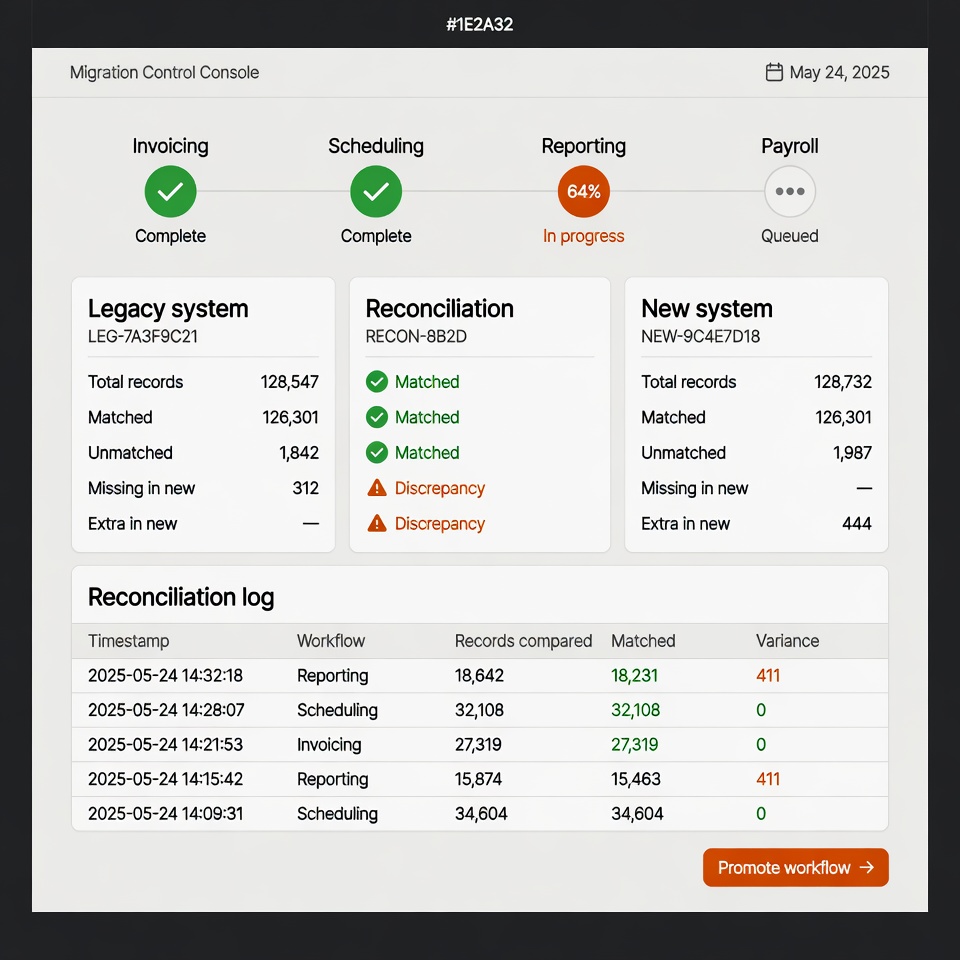
The approach that works is boring and incremental. Put the new system alongside the old one, move one workflow at a time, and run them in parallel until the new path is demonstrably correct. Each step is independently valuable and independently reversible. Nobody has to hold their breath on a cutover weekend.
This is slower to describe and faster to deliver, mostly because you find the undocumented behaviours one at a time while there is still a working system to compare against, rather than all at once during a migration weekend.
How an engagement runs
-
Map what it actually does
Not what the documentation claims. Reading the code and the data, and talking to whoever uses it daily, surfaces the undocumented behaviours that sink big-bang rewrites.
-
Get the data out first
Data is the part that genuinely cannot be recreated. Establishing a reliable export and a validated migration path early de-risks everything that follows.
-
Strangler pattern, one workflow at a time
New system alongside the old, routing one workflow at a time. Each move is small enough to reverse if something is wrong.
-
Run in parallel and reconcile
Both systems process real work while output is compared. Discrepancies get found by a script rather than by a customer.
-
Decommission deliberately
The old system is retired only once nothing depends on it and the data is archived somewhere you can still read in five years.
Proof
RecordStops — replacing a $497/month CRM with a purpose-built pipeline
RecordStops needed an outreach pipeline to reach independent record stores across five states. The off-the-shelf answer was a CRM at $497 a month, priced for a sales team rather than a directory operator, and still requiring manual work to fit the actual process. We built a custom outreach and drip pipeline instead, sized to the real workflow, running on the same Astro and Cloudflare D1 stack as the site itself. The subscription went away and the process fitted the business rather than the other way round.
$497/mo CRM replaced · 296 stores across 5 states · 16 city guides · 683 organic visitors/month
Read the RecordStops case study →What modernization costs
Modernization is priced per phase rather than as one number, because the honest answer depends on what the discovery sprint finds inside the existing system. The sprint produces a phased plan where each phase delivers something independently useful — which means you can stop between phases if priorities change, rather than being committed to a multi-year programme on day one.
- Discovery sprint
- from $5k — two weeks, refundable
- Typical phase
- $15k – $50k+
- Structure
- Phased, each phase independently valuable
Run your own numbers on the software cost calculator .
Questions about legacy system modernization
Do we have to take the system offline to migrate?
Almost never, and avoiding it is the central design goal. The strangler pattern puts the new system alongside the old one and moves a single workflow at a time, so the business keeps running throughout and each step is small enough to reverse. Brief downtime is sometimes needed for a final data cutover on one specific workflow, but that is measured in minutes and scheduled, not a weekend of everyone holding their breath. The scenario worth avoiding is the big-bang replacement, which is where migration horror stories come from.
What if nobody here understands the old system any more?
This is extremely common and it is a solvable problem, just a slower one. The system itself is the documentation: the code describes what it does, the database describes what it stores, and the people who use it daily know the behaviours that matter even if they cannot explain the internals. Discovery in this situation involves more reading and more observation, and the estimate reflects that. What genuinely helps is access to the running system with real data — behaviour that is invisible in the code is often obvious in the data.
Can we modernise part of it and leave the rest alone?
Yes, and that is frequently the right commercial answer. Not every part of a legacy system is equally risky — often one module handles something compliance-sensitive or blocks a business capability, while the rest is old but perfectly stable. Modernising selectively means spending on the part that actually creates risk. The discovery sprint ranks components by risk and by what each one blocks, so the spend goes where it changes something. Replacing stable, boring code that nobody needs to change is rarely worth it.
What happens to our data?
It gets treated as the irreplaceable asset it is, and it is addressed first rather than last. That means establishing a reliable export from the old system early, building a validated migration path, and running automated reconciliation so discrepancies are caught by a script rather than by a customer. Historical data that is no longer operationally needed gets archived in a format that will still be readable in five years — not left inside a system that is about to be switched off. Nothing is deleted from the old system until the new one is demonstrably correct.
The vendor who built it wants to quote for the rewrite. Should we let them?
Get the quote, and read it against an independent view of what the system actually does. The original vendor has genuine knowledge of the system, which is worth something real. They also have an incentive to propose a rewrite on their own stack, and they are the party least likely to tell you that half the system should simply be retired rather than rebuilt. A discovery sprint from someone with no stake in the outcome gives you a second opinion — and sometimes the finding is that the incumbent’s proposal is sound.
How long does a modernization take?
Longer than a greenfield build of the same functionality, because the new system has to match behaviour that was never written down and the business has to keep running throughout. A single workflow typically moves in weeks; a full system with many interlocking workflows is a multi-phase programme measured in months. The phased structure exists so this is not one long wait — each phase delivers something usable, and you can pause between phases without leaving the system half-migrated. The discovery sprint produces the phase map, so you see the sequence and the checkpoints before committing to the first phase rather than being asked to approve an open-ended programme.
Related services
- Internal Tools & Dashboards Operations dashboards, admin panels, and workflow software built around how your staff already work
- Custom SaaS Development Subscription software with real billing, real auth, and real users
- Fractional CTO Senior engineering judgement on retainer
Get an independent read
A discovery sprint gives you a phased plan and an honest assessment of what is worth replacing — from someone with no stake in the answer.