Internal Tools & Dashboards
Internal tools your team will actually use
Operations dashboards, admin panels, and workflow software built around how your staff already work — not around a vendor’s idea of your process.
The spreadsheet is load-bearing and everyone knows it
Most operations teams run on a spreadsheet that one person maintains, a SaaS tool that does 60% of the job, and a set of manual steps that exist purely to move data between the two. It works, in the sense that the business functions. It also means the process lives in one person’s head, breaks when they are on holiday, and cannot be audited when something goes wrong.
The usual response is to buy another SaaS product. Sometimes that is right. Often it is not, because the reason the current tool does 60% of the job is that your process is genuinely specific — and the next tool will also do 60%, just a different 60%. You end up paying three subscriptions and still exporting to CSV to get an answer.
The tell that a custom internal tool is the right call is when someone on your team has built an elaborate spreadsheet with lookups and conditional formatting to compensate for what the software will not do. That spreadsheet is a specification. It describes exactly the tool you need, written by the person who understands the process best.
The other tell is data that lives in a system built for somebody else. Vendor portals are designed for the vendor’s operations, not yours — which is why getting a straight answer out of one often means logging into three views and reconciling them by hand.
How an engagement runs
-
Watch the actual work
The discovery sprint starts with observing how the job gets done now, including the workarounds. The workarounds are the requirements — they mark every place the current system fails.
-
Model the data honestly
Getting the data model right is most of the work. A tool built on a schema that matches how the business actually thinks stays useful; one built on a convenient shortcut needs rewriting within a year.
-
Ship the one screen that hurts most
The first release solves the single most painful part of the workflow, in production, for real users. Adoption comes from relieving a specific pain, not from a feature-complete launch.
-
Role-based views
Operations, finance, and leadership need different answers from the same data. Building those as separate views beats one dashboard that satisfies nobody.
-
Automate the reconciliation
Scheduled jobs pull from the source systems so nobody is exporting CSVs on a Monday morning. The tool stays current without anyone maintaining it.
Proof
CLT EV Analytics — 208 stations in a single pane, for the City of Charlotte
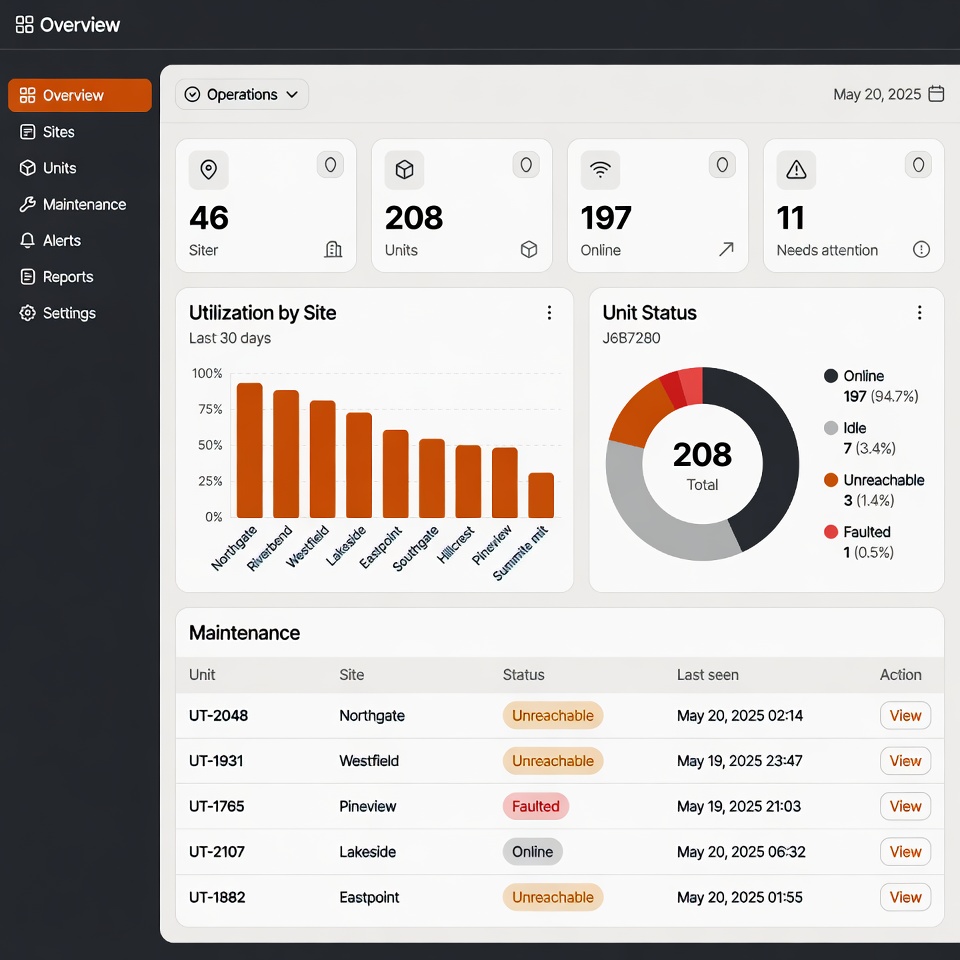
The City of Charlotte operates 208 ChargePoint EV stations across 46 locations, but city staff had to work through ChargePoint’s operator portal — a tool built for station operators, not municipal decision-makers — to answer basic questions about utilisation, electricity cost, and which stations were down. Data for three separate org units lived in separate views with no consolidated picture. We built the analytics dashboard their staff actually needed: a Worker pulls the ChargePoint API every 30 minutes into D1, and the front end surfaces utilisation, cost intelligence, and operational health — including the unreachable and faulted stations that need maintenance — with role-based views for operations, finance, and leadership.
208 stations · 46 locations · 3 org units unified · sub-100ms edge response · refreshed every 30 minutes
Read the CLT EV Analytics case study →What an internal tool costs
Internal tools are usually the least expensive custom software a business buys, because the user count is small, the design surface is modest, and there is no marketing site or public signup flow to build. The discovery sprint scopes it properly. The comparison worth running is not against the cost of doing nothing, but against the annual cost of the SaaS subscriptions and manual hours the tool replaces — that arithmetic often decides it.
- Discovery sprint
- from $5k — two weeks, refundable
- Typical internal tool
- $15k – $50k
- Ongoing
- Weekly retainer or fixed scope
Run your own numbers on the software cost calculator .
Questions about internal tools & dashboards
How do I know whether to build or just buy another SaaS tool?
Buy first, genuinely. If an off-the-shelf product does the job, it will be cheaper and better supported than anything custom. The case for building appears when your team has constructed elaborate spreadsheet workarounds around a tool, when you are paying for three overlapping subscriptions to cover one workflow, or when the data you need lives in a vendor portal designed for the vendor rather than for you. A useful test: add up the annual subscription cost plus the hours spent reconciling between systems. If that number is close to a build, custom usually wins on a three-year view.
Will my team actually use it?
That depends almost entirely on whether the first release solves a pain they already feel, which is why the first version targets the single worst part of the workflow rather than launching feature-complete. The other factor is whether the tool matches how they already think about the work. Software that imposes an unfamiliar model — even a technically better one — gets routed around. This is the specific advantage of building rather than buying: the vocabulary, the screens, and the steps can mirror your actual process instead of a vendor’s generic abstraction of it.
Can it pull data from the systems we already have?
Usually yes, and that is often the main point. If a system has an API, a scheduled job can pull from it on an interval — this is exactly what the CLT EV dashboard does with the ChargePoint API every 30 minutes. Where there is no API, the options are database access, a file drop, or scraping an export, in that order of preference. The discovery sprint checks integration feasibility early, because it is the thing most likely to change the estimate. Systems with genuinely no extractable data are rare but do exist.
What about permissions — not everyone should see everything?
Role-based views are usually built in from the start rather than added later, because retrofitting permissions onto a tool that assumed everyone sees everything is a genuinely painful piece of work. In practice this means operations, finance, and leadership each get a view answering their own questions from the same underlying data. It also covers the harder cases: a regional manager seeing only their region, or a contractor seeing one client’s records. Getting this right early is much cheaper than getting it right later.
Who maintains it after launch?
You have three options and all are legitimate. A small ongoing retainer covers changes, monitoring, and the occasional integration that breaks when a vendor updates their API. Alternatively, handover documentation and a runbook let an in-house developer take it over — the stack is deliberately mainstream so this is realistic rather than theoretical. The third option is nothing at all: a well-built internal tool on managed infrastructure can run untouched for long stretches. What determines which fits is how often the underlying business process changes.
How is this different from hiring a developer directly?
For a defined internal tool, a fixed-scope engagement is usually faster and cheaper than a hire, because there is no ramp-up, no recruitment cycle, and no ongoing salary once the tool is done. A hire makes more sense when you have a continuous pipeline of software work rather than one project. The honest framing: if this tool is the first of many and you expect a steady stream, start thinking about a hire — and a fractional CTO engagement can help you scope that role and evaluate candidates.
Related services
- Legacy System Modernization Aging on-prem and bespoke software moved to modern infrastructure incrementally
- Custom SaaS Development Subscription software with real billing, real auth, and real users
- Fractional CTO Senior engineering judgement on retainer
Price the tool before you commit
The cost calculator gives you an order of magnitude in a couple of minutes. Or book a 30-minute call and talk through whether building is even the right move.